Goodbye
Skiff – used as “skiff of snow” Slang in Saskatchewan for a few millimeters of fallen snow, not worth shovelling.
I’d like to think that Simon Fodden would approve of the fillips that will bookend this final blog post.
Simon Fodden, law professor, associate dean of law and pioneering blogger, died on February 10, 2018. Fodden, Simon Chester, Connie Crosby and Steve Matthews founded the definitive legal blog called Slaw.ca focusing on developments in legal information, research, and technology.
And although I did not meet him, we circulated in the same legal and libraries sphere. Of course, you can read about him at length on Slaw. Simon was curious about the world, generous with his time when we emailed, and an intellectual without being snobbish.
Without Simon’s seminal efforts in law blogging bringing librarians into the conversation, there is a strong probability that Karen Sawatzky and I would not have started our blog. For more than a decade Slaw has grown to become a standard bearer for legal blogs. Its influence is wide reaching as I still refer to it as a way of keeping current in legal research and practice. Reading Slaw became a habit and a source of information for many readers.
In 2005 when Slaw emerged, the world was a dramatically different place. Paul Martin was the prime minister of Canada. The Kyoto protocol on reducing greenhouse emissions was signed. The iPhone didn’t exist yet as Blackberry was the dominant player in the emerging smart phone industry. And I had left my home town to start a new life in Winnipeg. Unknown to me I would become the library manager for a major law firm further developing my interest in private law libraries.
After moving away from law libraries and Toronto, I can appreciate the skill building as well as the subject knowledge that I gained. My fellow blogger Karen Sawatzky has moved on as the Director of Legal Resources at the Law Society of Manitoba. I am now the reference librarian at a public library in rural Saskatchewan.
I don’t know what the future holds for me professionally. But both Karen and I are pulled in diverging areas. With Simon Fodden’s passing, this seems like a final chapter. We have enjoyed sharing information and trends over the past years, but this is our final blog post.
The law and courts are often seen as a private club with its own arbitrary rules and archaic language. Other professions also have obscure idioms almost akin to a secret language. Grandfather clocks in this digital age still exist, and those that repair pendulum clocks have their own language. Establishing a rhythm through beats is not just about drum beats for musicians as clock repairer’s talk devote great detail to “setting the beat.”
Setting the beat of a pendulum clock is adjusting the clock mechanism to achieve an even sounding TICK and TOCK rhythm. If you really need to know more information:
https://www.theclockdepot.com/clocks-blog/how-to-set-the-beat-on-your-pendulum-clock/
Filed under: Uncategorized | 5 Comments
Re-imagining The Library
Every day I think about this: if I were setting up my library today, what would it look like? Aside from having lots of windows (I need sunlight!) I haven’t gotten very far on this.
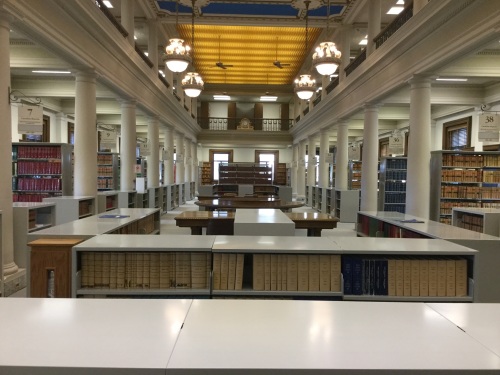
I serve two very disparate client bases: the legal profession, and the general public looking for legal information. The legal resources I purchase are written for lawyers and they’re not readily understandable by someone without legal training. One idea I’ve had is to purchase materials that are at a less sophisticated level and that deal more with procedure rather than substantive law. Perhaps that would be a way to level the playing field for self-represented litigants.
Another idea I’m toying with is separating my footage into two distinct areas – one just for lawyers, and one for everyone else. Lawyers working in the library shouldn’t have to worry that someone is going to ask for free advice, or that they’ll break client confidentiality.
Then there is the difficulty of serving a geographically dispersed client base. Lawyers outside the city contribute the same amount towards library costs, and should get a similar rate of return. All types of libraries end up serving a fraction of their potential audience – my concern is my audience is just a fraction of that fraction. And rural self-represented litigants also deserve access to resources.
A recently published report titled Justice starts here : A One Stop Shop Approach for Achieving Greater Justice in Manitoba may be the catalyst to kick-start the process. I hope I can be part of the solution.
-Karen
Filed under: Advocacy | 1 Comment
Tablet vs. computer vs. phone
In my post Halloween sugar rush, my thoughts turn to young kids and how they interact with computer technology in all its forms from laptops to smart phones. There is a lot of fear about the harmful effects of computers as an electronic babysitter on children.
I want to flip the perspective and see computer technology from their viewpoint. My niece, under age 10, will only know of a world of emojis on smartphones, but I propose some kids are more savvy than adults give them credit for. Some kids understand that computers are tools to achieve a purpose, much like a wrench is different from a hammer.
Out of the blue, a 6 year old student commented to me about the ipads in his classroom and the laptops for all students. Davey told me that Ipads were for games, and laptops were for work. Part of his observation was based on the older students signing out laptops for research or English assignments. But I was impressed by his ability to articulate coherently the differences between tablets and computers.
The argument about the right tool for the right job was resonating with me again, as I read a student blog by Ethan, aged 9 and a homeschooled student currently on a cross Canada road trip. My interest in homeschooling and computer technology came to the forefront with Ethan’s discussion of computers vs. phones. Full disclosure – I am related to Ethan.
Ethan has distilled the major points of strength and weaknesses of computers and smart phones by using an app available on computers. If I am buying a new computer, I will follow Ethan’s steps about buying what I need, and not what I think I want. Ethan’s process is similar to what most of us, as rational consumers, will go through when making a big ticket purchase.
But because kids typically are not as developed cognitively like adults we tend to discount their perceptions, but both Davey and Ethan prove us wrong. The challenge as parents and educators is to use computers in a thoughtful and tactical way. It is a formidable challenge as many adults aren’t comfortable using computers themselves, or fall into the rabbit hole of wasting time on the internet. As ever the optimist, I am hopeful that young kids will grow up to be both smart consumers or smart programmers.
- Brenda
Filed under: Uncategorized | 1 Comment
Readers’ Advisory
You think you know where to find books in the library, when you are a librarian. But my experience proves that every public library is planned differently posing challenges for the reader and readers’ advisory. We moved into a new neighbourhood in Toronto, and I began visiting a different library branch. When I visited this large library, I made my selections by browsing the adult fiction shelves on the main level, always finding something to read as this practise went on for weeks. Then I looked for an older title in a series that I enjoyed, but it wasn’t where I was used to looking as it was located on another floor.
I mentioned my experience to a friend, who told me the main floor was only the browsing collection, as she had had a library tour there. I had wrongly assumed the other floors were subject specific, like business or art collections, never venturing off the main floor. The main floor was planned with adult fiction for a convenient “grab and go” experience along with a children’s section. I didn’t realize that the complete fiction section was available on another floor.
There is some debate about how books are organized in the public library. Old school layouts have adult fiction centrally located in one place. The browsing collection met my needs for a long time until I needed an older title from the catalogue. Dividing the fiction collection means that popular titles can be grouped together and circulate more. But it can also be a source of frustration, if users don’t know there is more than one place to look for books.
I am thinking about all of this as I research the history of readers’ advisory, and where it is going next. On a more general level the book selection process is critical. When readers have a great read by selecting books based on complex factors, such as past experience, the book itself, and recommendations from their friends and family, they have a successful experience and want to read more. And unsatisfactory book selection may also lead to “disappointing choices (that kills) the desire to read.” (Ross, 2000)
Ross, C. (2000). Making choices: What readers say about choosing books to read for pleasure. The Acquisitions Librarian, 13(25), 5. doi:10.1300/J101v13n25_02
http://ojs.library.ubc.ca/index.php/seealso/article/view/186334/185508
I saw this experience repeatedly in a school library as committed readers would try a variety of books or ask for the teacher’s or librarian’s help. Those who were not strong readers and were book shy needed a lot more help or readers’ advisory assistance. It became a self-fulfilling prophecy that ones who thought of themselves as readers were, and those who defined themselves as poor readers continued to struggle.
Before I started my research on readers’ advisory, I thought it was based on developing book lists or finding read alikes in databases like Novelist. Now I think those who specialize in readers’ advisory think beyond genres trying to see selection through the reader’s eyes. When readers’ advisory is practiced as its highest level, then magic happens for the patron and the librarian.
Readers bring their own experience and expectations unknowingly to the selection process. As librarians we try to quantify the experience to provide public service. One method to open the conversation on readers’ advisory is based on the “doorways into the book” as librarian and author Nancy Pearl has explained. The doorways can be categorized as how appealing the character, language, setting and story is to the reader. This sounds like a creative writing exercise to me. While I don’t disagree, I think readers can’t always articulate their preference that way and they end up speaking about genres, authors and things they don’t like in a book.
The practice of readers’ advisory is complex and fascinating likely worthy of a series of blog posts, but I will conclude with a few sources to whet your appetite for further reading.
– Brenda
Sources
Readers’ Advisory Services wiki, New South Wales, Australia
The State of Readers’ Advisory (February 2014)
Ferri, Anna. “Book Appeal, Literacy, and the Reader: Readers’ advisory in practice and theory” No. 1, Spring 2015, The UBC School of Library, Archival and Information Studies Student Journal. Online 12 July 2017.
Filed under: Public library, readers' advisory | Closed
A Welcoming Space
Public libraries are a lot like the tardis in Dr. Who. They are more complex from what they appear to be. Similar to the tardis which is seemingly a blue police call box in the science fiction tv series, libraries seem to be books on the shelf or merely “bricks and mortar libraries” as Saskatchewan Education Minister Don Morgan recently called them. The parallel is uncanny as libraries reveal themselves to be an engine delivering community programs, as the tardis reveals itself to be the engine propelling Dr. Who into his travels.
“We think as a province we should be getting out of bricks and mortar libraries and people should be focusing on electronic or alternate media,” Morgan said.
Morgan also commented,
A library may not be a place that should be used as a sanctuary.
(Both assertions from “Provincial budget sees cuts to Regina libraries, U of R funding”
by Christina Dao at
http://globalnews.ca/news/3329088/provincial-budget-sees-cuts-to-regina-libraries-u-of-r-funding/ )
The term sanctuary is defined as a safe place or a refuge. In a way, the library can be a transformative space as it is a public space, but not public like the street is. The library is not a a private space like my home is, where I make the rules. The exciting thing is the library can be a welcoming, transformative space as patrons are reading, exploring and learning each individually but collectively as a group too. We lack places, like the library, in civic life that enrich people’s lives.
You might say what is the big deal as you can go to the coffee shop or stay at home. But both those places are not the same as the library, where you will rub shoulders with people that you may not interact with. And for many towns in Saskatchewan, the library and a few other services may constitute the town. See a blog post in Sources for an opinion piece on how libraries fit into small town life.
(Full disclosure that I had an insider’s knowledge of the public library system in Saskatchewan as I was employed by Parkland Regional Library until recently. I have visited all 55 branches in a rural region.)
The majority of the Parkland branches held various community programs through out the year. Many volunteer hours and materials went into bake sales and raffles, often for Saskatchewan Library Week in October. Or it could be tech time for troubleshooting ebooks. There may not be a local theatre so movie nights are popular, as is special speakers on health or travel topics. For the younger set, there are special events, like pizza night or teddy bear sleep overs, as an addition to regular story time. Soon there will be summer reading club as well to engage kids reading beyond the school year. Other community groups will meet there ranging from gamers to genealogical enthusiasts. There is a long list of programs that branches report. Each event is the culmination of planning, implementing as well as paid and unpaid labour to pull off a successful community program.
One of my favourites, because it combines food and books, is hosted by Foam Lake public library. In a town with 1,148 population in 2011, the public library has hosted an English tea complete with fine china. They also held an intergenerational book reading in which older adults and teenagers read selections from their favourite books. It was a great way to promote literacy, share reading and overall build social capital.
On a personal note, the library welcomes newcomers. When I move to a new town, part of the routine is to suss out where my local library is and sign up for a card. Along with borrowing materials in many formats like magazines or DVDs, I have another reason to visit the library. I make sure to spend time reading the community board full of posters promoting upcoming events, fundraisers, or other activities that may interest me.
Lastly as a library patron of four public library systems, I applaud those who developed the successful efficient resource-sharing model in delivering library service to those who lived in cities as well as rural areas of Saskatchewan. It shocks and saddens me in equal measure that the One Card, One Province system has been been effectively decimated by severe budget cutbacks.
Libraries appear to be a book warehouse to the untutored, but upon closer examination they support all people in rural areas through delivering community programs in many sizes and shapes.
— Brenda
UPDATE – Library funding restored, April 24 2017. Also a timeline of major events in the Save Sask. Libraries campaign.
Sources:
Another perspective on libraries in Saskatchewan towns:
http://headtale.com/2017/04/17/skpoli-savesklibraries-music-monday-educated-in-a-small-towntaught-the-fear-of-jesus-in-a-small-townused-to-daydream-in-that-small-townanother-boring-rBudget-Cuts-FAQsFact sheet – What’s being saidomantic-thats-me/
Read more about how active public libraries are in Saskatchewan countering rheotoric and misconceptions.
Fact sheet – What’s being said
Ontario report on libraries:
Filed under: Advocacy, Public library, Saskatchewan budget cuts, Uncategorized | 2 Comments
Libraries have a duty to preserve information as well as provide access to current information. The largest ones – academic, courthouse, the National Library – are seen by smaller libraries as the “library of last resort”. What happens when these institutions cut their collections?
I’ve watched the Manitoba Great Library and the University of Manitoba Law School library cut back on their collections. I understand the fiscal pressure – my own library is not as big as it was when I started here five years ago. Legal publishers have been mining the looseleaf services gold for too long. The only way for law libraries to fight back is to cancel subscriptions. We then face the problem of potentially not having the resources for our members to perform their job competently.
It’s very difficult to provide the resources necessary when your budget is being cut. No one service can provide everything. The Federation of Law Societies is putting a lot of resources into CanLII, but CanLII is a database of decisions and legislation. While much work has been done on improving its content and functionality for primary sources, it isn’t able to fulfil the need for lawyers for secondary sources. These authoritative texts, many published in looseleaf format and available by subscription only, provide the commentary necessary to understand and interpret the primary sources.
So what is the solution? Maybe a Federation of Law Society libraries, where each library agrees to be the library of last resort for a particular area? Or a consortium of law school libraries? Or a combination of both? What about the role of provincial archives, or Library and Archives Canada? How do we preserve historical material and ensure it’s also available for use?
~ Karen
UPDATE – Repository of Ontario materials launched
Five university libraries in Ontario (at the University of Ottawa, the University of Western Ontario, Queen’s, University of Toronto, and McMaster) are participating in the Keep@Downsview partnership, which is a shared last print copy repository project.
Filed under: Advocacy | Closed
Tags: Advocacy, Publishing
On public speaking
It is a weird thing that we want to hear a writer give a presentation, when she has written on a subject. Accidentally I have become a writer and speaker on law libraries and other information issues. The impulse to hear a speaker stems from wanting to hear firsthand how the person “talks the walk,” or how students have traditionally learned in schools.
I was nervous the first time I was scheduled to give a talk, because my strength is writing over talking out ideas. But I turned to Connie Crosby, librarian extraordinaire, who encouraged me by turning the anxiety into something positive. She stated that people are silently cheering you on, when you are on stage. They are anticipating what you have to say, so they are receptive to your message.
Although the content of talk is important, some research shows that appearance of the speaker and tone of voice can be more dominant than the message. Appearance can include style; for example, women should reconsider dangly earrings, which are distracting. There is a host of nonverbal cues that we subconsciously interpret, as smiling makes us seems more relaxed and friendly. Overall being dressed appropriately for your audience is the best advice.
Tone of voice is also critical. If you talk fast or have a high pitched voice, those traits can interfere with the listener’s ability to understand you. A relaxed speaker varies the pitch of their voice, and one follows the flow of the speech easier. One trick is to record yourself to identify verbal ticks like “um” “like” etc.
Other nonverbal cues include audience interaction. I pick out 2 people in the audience about midway in the room and talk to them, maintaining comfortable eye contact. It has a transforming effect as one bonds with the audience members, drawing them into the conversation.
The best case scenario is, at the end of the talk, there will be questions furthering the discussion. You know you have done your job to inspire, or inform when the audience wants to talk back.
- Brenda
Filed under: Professional Development, public presentation | Closed
Librarian as consultant
IT is an industry that sees a fair amount of consulting work. As the library and information science field changes, perhaps there will be more librarians working as consultants too. I worked in such a capacity last year. It was a long held dream of mine to shape a project from the ground up.
Then I was recruited to consult for a mid sized law firm through my Linked In contacts. Initially the scope of the job was based on training and moving books. It grew into a lot more after some negotiations and discussion on skills that I brought to the table. One of the unexpectedly gratifying things about acting as a consultant is achieving practical solutions. You come in with a specific responsibility and all your energy is targeted to get the job done.
The flexibility in scheduling work is also attractive to many people. It worked out for me to have a side job, when I had some down time. Control over a work schedule can also be a deciding factor for a female professional juggling family and work responsibilities.
I also got to travel and visit another city while consulting. This may be a another key factor for some people to take up the opportunities.
A potential down side of consulting work is that there is little chance to develop loyalty to the company. As a consultant you are a hired gun on the outskirts of corporate culture. The role is great for seeing projects executed, but not for developing long term strategy as a department head.
- Brenda
Filed under: Career portfolio, consulting, Employment | Closed
Goodbye Twitter
Filed under: Social Media, Twitter | Closed
Law librarian as researcher
Article below was originally posted in Legal Sourcery blog
(February 11, 2016):
https://lsslib.wordpress.com/2016/02/11/law-librarian-as-researcher/
The librarian in law firm setting is part of profit-making business, which inevitably leads to a different type of role than a librarian in a university or public library. One of the main differences is that they have an ongoing relationship with their clients. Often librarians will attend practice group meetings to keep abreast of what files the lawyers are working on. They are highly specialized professionals, involved in research, library administration, and collaborating with other departments. This article will primarily deal with research.
Most legal reference questions are complex, and even the basic ones require some subject knowledge. A basic question could involve retrieving a list of cases for a brief of authorities. Frequently the questions are more complex:
I remember a recent case in Alberta involving a homeowner who sued a golf course over golf balls that landed in their property. Can you get it for me?
The librarian must parse the question, frequently asking for more details. It also helps to know that every lawyer is very subjective when it comes to the term “recent.” Complex reference questions can mean many hours of labour or pulling in other staff to assist. Legal research is satisfying and intensive work as there is often a time crunch. It is not for the faint of heart. Research is often the most visible responsibility of a law librarian.
Another, more invisible, role the law librarian plays involves collection development, or ensuring the library maintains current information to meet the practice areas of the law firm. Sometimes collection development also means canceling looseleaf services, if the same information is now delivered electronically. Librarians keep tabs on emerging fields of law and emerging authors adding to the print collection. Often librarians need to make some hard decisions about their budget so costs are manageable. They also undergo continuous training in order to be effective researchers using the latest features of commercial databases, like WestlawNext Canada or Quicklaw.
An overlooked aspect of having a law librarian on staff is that their effective research skills save the firm money. In private practice wasted time is a waste of resources and money. For example, the commercial database searches are the opposite of Google in certain ways. They work best with focused or Boolean searching, so plunking keywords into WestlawNext is a case of garbage in and garbage out. Not only is it an ineffective practice, but unnecessary searches can have other ramifications, such as driving up the cost of such databases. Librarians aim to train lawyers so they firstly reframe reference questions to find background information in textbooks before searching on commercial databases.
The advent of CanLII has been a tremendous boost to online research, but it does not have specialized tools like encyclopedias or newsletters providing context to the case law. It is hoped over time there will be more innovations from CanLII leading to even more secondary sources.
Some research will likely be handed over to the librarian as it may be time-intensive and very specialized legal research. Historical legislative research tracing back how an act has changed is fascinating and complex. It involves a deep dive into annual statutes and consolidations, laying out the print volumes to see how they relate to each other.
Although this article has explored the research process, the law librarian is also involved in administration like budgeting and contract negotiations of databases, as well as collaborating with other departments. Collaboration can look like implementing a memos database with IT or developing competitive intelligence projects with marketing. Librarian Shaunna Mireau of Field Law in Edmonton, for example, is involved in overseeing firm-wide knowledge management projects so information is shared and used effectively.
The law librarian plays an integral role in research at a private firm. The information will feed into an opinion letter to a client or legal memo. Librarians save the firm time and money with their honed research skills, freeing up lawyers to complete other tasks. “We support our users by giving them the answer, not teaching them how to get the answer – most of the time,” said librarian Karen Sawatzky of Tapper Cuddy in Winnipeg.
Some of the research time may be billed to clients, too. In firms in which the librarians bill their time, they can be directly contributing to work product as well as generating revenue. Librarians billing their time, however, is another topic to be explored.
Many law librarians will say that research is their favourite part of their day as it is never boring and always challenging. Librarians strive to do research using both print and electronic resources while also training lawyers to improve their skills. After working in different types of libraries, I must say that legal research is rewarding and fascinating because it has real life implications.
Sources
Demers, A., ed, Legal Information Specialists: A Guide to Launching and Building Your Career, (Toronto: LexisNexis Canada, 2012).
Lambert, G., “In the the age of Google, law librarians manage your time, people and money” (January 12, 2016), 3 Geeks and a Law blog, online:
http://www.geeklawblog.com/2016/01/in-age-of-google-law-librarians-manage.html
- Brenda Wong
Filed under: Uncategorized | 1 Comment
 Brenda Wong
 Karen Sawatzky


 Library technician dialog